Choosing the right architecture for Web Applications is a must, especially for large scale ones. Using the default Visual Studio ASP.NET MVC Web Application project templates, adding controllers with Scaffolding options, just to bootstrap your application and create pages and data in just a few minutes, sounds awesome for sure, but let’s be honest it’s not always the right choise. Peeking all the default options, keeping business, data and presentation logic in the same project will impact several factors in your solutions, such as scalability, usability or testability. In this post, will see how to keep things clean, creating a highly loosely coupled ASP.NET MVC Solution, where Data Access, Business and Presentation layers are defined in the right manner. To do this, we ‘ll make use of several patterns and frameworks, some of those are presented below.
- Entity Framework Code First development
- Generic Repository Pattern
- Dependency Injection using Autofac framework
- Automapper
The architecture we will try to build in this post is summarized in the following diagram.

Let’s start. Assuming we want to built an e-shop Web Application called “Store”, create a blank solution with the same name.
Models
Add a class library project to the solution, named Store.Model. This library is where we ‘ll keep all of our domain objects. Entity Framework will count on them in order to build the database but we are not going to configure Code First using DataAnnotations attributes on this project. Instead, we are going to put all the Code First configuration in specific Configuration classes using the Fluent API. Add a folder named Models and add the following two simple classes.
public class Gadget
    {
        public int GadgetID { get; set; }
        public string Name { get; set; }
        public string Description { get; set; }
        public decimal Price { get; set; }
        public string Image { get; set; }

        public int CategoryID { get; set; }
        public Category Category { get; set; }
    }
public class Category
    {
        public int CategoryID { get; set; }
        public string Name { get; set; }
        public DateTime? DateCreated { get; set; }
        public DateTime? DateUpdated { get; set; }

        public virtual List<Gadget> Gadgets { get; set; }

        public Category()
        {
            DateCreated = DateTime.Now;
        }
    }
I preffered to keep the namespace Store.Model instead of the namespace Store.Model.Models
Data Access Layer and Repositories
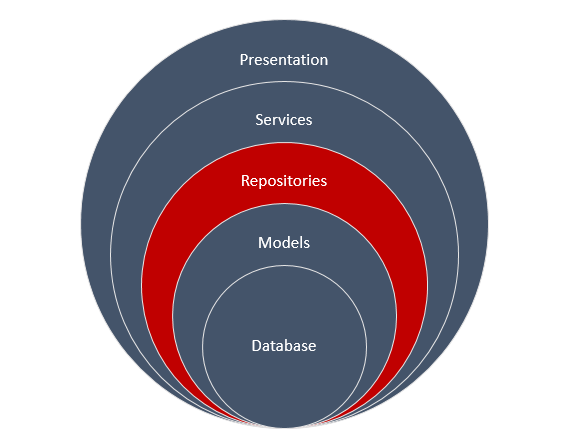
The purpose of this layer, is the direct access to the database. It’s the only layer responsible to communicate with the database. If some other layer wants to access the database, then this will be done through some of the classes (repositories) we will define in this project. This will be strictly the only way Add a new class library project named Store.Data and make sure you add a reference to the previous created project, Store.Model. Install Entity Framework using the Nuget Package Manager. First thing we wanna do, is to define the Entity Type Configurations for our domain objecs. Add a folder named Configuration with the following two classes that inherits the EntityTypeConfiguration class.
public class GadgetConfiguration: EntityTypeConfiguration<Gadget>
    {
        public GadgetConfiguration()
        {
            ToTable("Gadgets");
            Property(g => g.Name).IsRequired().HasMaxLength(50);
            Property(g => g.Price).IsRequired().HasPrecision(8, 2);
            Property(g => g.CategoryID).IsRequired();
        }
    }
public class CategoryConfiguration : EntityTypeConfiguration<Category>
    {
        public CategoryConfiguration()
        {
            ToTable("Categories");
            Property(c => c.Name).IsRequired().HasMaxLength(50);
        }
    }
There isn’t any difficult configuration to explain, the point is just to understand where to put the right objects. The next thing we will do is to create the DbContext class that will be responsible to access the database. Add the following class under the root of the current project.
public class StoreEntities : DbContext
    {
        public StoreEntities() : base("StoreEntities") { }

        public DbSet<Gadget> Gadgets { get; set; }
        public DbSet<Category> Categories { get; set; }

        public virtual void Commit()
        {
            base.SaveChanges();
        }

        protected override void OnModelCreating(DbModelBuilder modelBuilder)
        {
            modelBuilder.Configurations.Add(new GadgetConfiguration());
            modelBuilder.Configurations.Add(new CategoryConfiguration());
        }
    }
We want to seed the database when our application fire up for the first time, so add the following class to the root of the project as well.
public class StoreSeedData : DropCreateDatabaseIfModelChanges<StoreEntities>
    {
        protected override void Seed(StoreEntities context)
        {
            GetCategories().ForEach(c => context.Categories.Add(c));
            GetGadgets().ForEach(g => context.Gadgets.Add(g));

            context.Commit();
        }

        private static List<Category> GetCategories()
        {
            return new List<Category>
            {
                new Category {
                    Name = "Tablets"
                },
                new Category {
                    Name = "Laptops"
                },
                new Category {
                    Name = "Mobiles"
                }
            };
        }

        private static List<Gadget> GetGadgets()
        {
            return new List<Gadget>
            {
                new Gadget {
                    Name = "ProntoTec 7",
                    Description = "Android 4.4 KitKat Tablet PC, Cortex A8 1.2 GHz Dual Core Processor,512MB / 4GB,Dual Camera,G-Sensor (Black)",
                    CategoryID = 1,
                    Price = 46.99m,
                    Image = "prontotec.jpg"
                },
                new Gadget {
                    Name = "Samsung Galaxy",
                    Description = "Android 4.4 Kit Kat OS, 1.2 GHz quad-core processor",
                    CategoryID = 1,
                    Price = 120.95m,
                    Image= "samsung-galaxy.jpg"
                },
                new Gadget {
                    Name = "NeuTab® N7 Pro 7",
                    Description = "NeuTab N7 Pro tablet features the amazing powerful, Quad Core processor performs approximately Double multitasking running speed, and is more reliable than ever",
                    CategoryID = 1,
                    Price = 59.99m,
                    Image= "neutab.jpg"
                },
                new Gadget {
                    Name = "Dragon Touch® Y88X 7",
                    Description = "Dragon Touch Y88X tablet featuring the incredible powerful Allwinner Quad Core A33, up to four times faster CPU, ensures faster multitasking speed than ever. With the super-portable size, you get a robust power in a device that can be taken everywhere",
                    CategoryID = 1,
                    Price = 54.99m,
                    Image= "dragon-touch.jpg"
                },
                new Gadget {
                    Name = "Alldaymall A88X 7",
                    Description = "This Alldaymall tablet featuring the incredible powerful Allwinner Quad Core A33, up to four times faster CPU, ensures faster multitasking speed than ever. With the super-portable size, you get a robust power in a device that can be taken everywhere",
                    CategoryID = 1,
                    Price = 47.99m,
                    Image= "Alldaymall.jpg"
                },
                new Gadget {
                    Name = "ASUS MeMO",
                    Description = "Pad 7 ME170CX-A1-BK 7-Inch 16GB Tablet. Dual-Core Intel Atom Z2520 1.2GHz CPU",
                    CategoryID = 1,
                    Price = 94.99m,
                    Image= "asus-memo.jpg"
                },
                // Code ommitted
            };
        }
    }
I have ommitted some of the Gadges objects for brevity but you can always download the solution project at the bottom of this post. Now let’s create the Heart of this project. Add a folder named Infrastructure. In order to use the Repository Pattern in the right manner, we need to define a well designed infrastructure. From the bottom to the top all instances will be available through injected interfaces. And the first instance we will require, guess what.. will be an instance of the StoreEntities. So let’s create a factory Interface responsible to initialize instances of this class. Add an interface named IDbFactory into the Infrastructure folder.
public interface IDbFactory : IDisposable
    {
        StoreEntities Init();
    }
You can see that this interface inherits the IDisposable one, so the Concrete class that will implement the IDbFactory interface, must also implement the IDisposable one. To do this in a clean way, add a Disposable class that will implement the IDisposable interface. Then any class that will implement the IDbFactory interface, will just want to inherit this very class.
public class Disposable : IDisposable
    {
        private bool isDisposed;

        ~Disposable()
        {
            Dispose(false);
        }

        public void Dispose()
        {
            Dispose(true);
            GC.SuppressFinalize(this);
        }
        private void Dispose(bool disposing)
        {
            if (!isDisposed && disposing)
            {
                DisposeCore();
            }

            isDisposed = true;
        }

        // Ovveride this to dispose custom objects
        protected virtual void DisposeCore()
        {
        }
    }
I have highlighted the DisposeCore virtual method cause this method will make others classes inherit this one, to dispose their own objects in the way the need to. Now add the implementation class of the IDbFactory interface.
public class DbFactory : Disposable, IDbFactory
    {
        StoreEntities dbContext;

        public StoreEntities Init()
        {
            return dbContext ?? (dbContext = new StoreEntities());
        }

        protected override void DisposeCore()
        {
            if (dbContext != null)
                dbContext.Dispose();
        }
    }
It’s time to create a generic IRepository interface where we will declare the default operations that our repositories will support. Here I added some that i thought are the most used ones, but you can extend those operations as you wish.
public interface IRepository<T> where T : class
    {
        // Marks an entity as new
        void Add(T entity);
        // Marks an entity as modified
        void Update(T entity);
        // Marks an entity to be removed
        void Delete(T entity);
        void Delete(Expression<Func<T, bool>> where);
        // Get an entity by int id
        T GetById(int id);
        // Get an entity using delegate
        T Get(Expression<Func<T, bool>> where);
        // Gets all entities of type T
        IEnumerable<T> GetAll();
        // Gets entities using delegate
        IEnumerable<T> GetMany(Expression<Func<T, bool>> where);
    }
Notice that the CRUD operations are commented as Mark to do something... This means that when a repository implentation adds, updates or removes an entity, does not send the command to the database at that very moment. Instead, the caller (service layer) will be responsible to send a Commit command to the database through a IUnitOfWork injected instance. For this to be done will use a pattern called UnitOfWork. Add the following two files into the Infrastructure folder.
public interface IUnitOfWork
    {
        void Commit();
    }
public class UnitOfWork : IUnitOfWork
    {
        private readonly IDbFactory dbFactory;
        private StoreEntities dbContext;

        public UnitOfWork(IDbFactory dbFactory)
        {
            this.dbFactory = dbFactory;
        }

        public StoreEntities DbContext
        {
            get { return dbContext ?? (dbContext = dbFactory.Init()); }
        }

        public void Commit()
        {
            DbContext.Commit();
        }
    }
In the same way we used the Disposable class we are going to use an abstract class that has virtual implementations of the IRepository interface. This base class will be inherited from all specific repositories and hence will implement the IRepository interface. Add the following class.
public abstract class RepositoryBase<T> where T : class
    {
        #region Properties
        private StoreEntities dataContext;
        private readonly IDbSet<T> dbSet;

        protected IDbFactory DbFactory
        {
            get;
            private set;
        }

        protected StoreEntities DbContext
        {
            get { return dataContext ?? (dataContext = DbFactory.Init()); }
        }
        #endregion

        protected RepositoryBase(IDbFactory dbFactory)
        {
            DbFactory = dbFactory;
            dbSet = DbContext.Set<T>();
        }

        #region Implementation
        public virtual void Add(T entity)
        {
            dbSet.Add(entity);
        }

        public virtual void Update(T entity)
        {
            dbSet.Attach(entity);
            dataContext.Entry(entity).State = EntityState.Modified;
        }

        public virtual void Delete(T entity)
        {
            dbSet.Remove(entity);
        }

        public virtual void Delete(Expression<Func<T, bool>> where)
        {
            IEnumerable<T> objects = dbSet.Where<T>(where).AsEnumerable();
            foreach (T obj in objects)
                dbSet.Remove(obj);
        }

        public virtual T GetById(int id)
        {
            return dbSet.Find(id);
        }

        public virtual IEnumerable<T> GetAll()
        {
            return dbSet.ToList();
        }

        public virtual IEnumerable<T> GetMany(Expression<Func<T, bool>> where)
        {
            return dbSet.Where(where).ToList();
        }

        public T Get(Expression<Func<T, bool>> where)
        {
            return dbSet.Where(where).FirstOrDefault<T>();
        }

        #endregion

    }
Since the implementations marked as virtual, any repository can ovveride a specific operation as required. And now the Concrete repositories: Add a new folder named Repositories and add the following two classes:
public class GadgetRepository : RepositoryBase<Gadget>, IGadgetRepository
    {
        public GadgetRepository(IDbFactory dbFactory)
            : base(dbFactory) { }
    }

    public interface IGadgetRepository : IRepository<Gadget>
    {

    }
public class CategoryRepository : RepositoryBase<Category>, ICategoryRepository
    {
        public CategoryRepository(IDbFactory dbFactory)
            : base(dbFactory) { }

        public Category GetCategoryByName(string categoryName)
        {
            var category = this.DbContext.Categories.Where(c => c.Name == categoryName).FirstOrDefault();

            return category;
        }

        public override void Update(Category entity)
        {
            entity.DateUpdated = DateTime.Now;
            base.Update(entity);
        }
    }

    public interface ICategoryRepository : IRepository<Category>
    {
        Category GetCategoryByName(string categoryName);
    }
You can see that the GadgetRepository supports the default operations using the default behavior and of course that’s OK. On the other hand, you can see an example where a specific repository requires to either extend it’s operations (GetCategoryByName) or overried the default ones (Update). Usually you add a repository for each of your Model classes, hence each repository of type T, is responsible to manipulate a specific DbSet through the DbContext.Set<T>. We are done implementing the Data Access layer so we can procceed to the next one.
Service Layer

What operations do you want to expose your MVC Controllers? Where is the business logic is going to be implemented? Yeap.. you have guessed right, in this very layer. Add a new class library project named Store.Service. You will have to add references to the two previous created projects, Store.Model and Store.Data. Notice I haven’t told you yet to install Entity Framework to this project.. and I am not going to, cause any database operation required will be done through the injected repositories we created before. Add the first Service file to this project.
// operations you want to expose
    public interface IGadgetService
    {
        IEnumerable<Gadget> GetGadgets();
        IEnumerable<Gadget> GetCategoryGadgets(string categoryName, string gadgetName = null);
        Gadget GetGadget(int id);
        void CreateGadget(Gadget gadget);
        void SaveGadget();
    }

    public class GadgetService : IGadgetService
    {
        private readonly IGadgetRepository gadgetsRepository;
        private readonly ICategoryRepository categoryRepository;
        private readonly IUnitOfWork unitOfWork;

        public GadgetService(IGadgetRepository gadgetsRepository, ICategoryRepository categoryRepository, IUnitOfWork unitOfWork)
        {
            this.gadgetsRepository = gadgetsRepository;
            this.categoryRepository = categoryRepository;
            this.unitOfWork = unitOfWork;
        }

        #region IGadgetService Members

        public IEnumerable<Gadget> GetGadgets()
        {
            var gadgets = gadgetsRepository.GetAll();
            return gadgets;
        }

        public IEnumerable<Gadget> GetCategoryGadgets(string categoryName, string gadgetName = null)
        {
            var category = categoryRepository.GetCategoryByName(categoryName);
            return category.Gadgets.Where(g => g.Name.ToLower().Contains(gadgetName.ToLower().Trim()));
        }

        public Gadget GetGadget(int id)
        {
            var gadget = gadgetsRepository.GetById(id);
            return gadget;
        }

        public void CreateGadget(Gadget gadget)
        {
            gadgetsRepository.Add(gadget);
        }

        public void SaveGadget()
        {
            unitOfWork.Commit();
        }

        #endregion

    }
The first and the last highlighted code lines reminds you why we created the IUnitOfWork interface. If we wanted to create a gadget object though this service class, we would write something like this..
// init a gadget object..
gadgetService.CreateGadget(gadget);
gadgetService.SaveGadget();
The other highlighted code lines denotes that any required repository for this service, will be injected through it’s constructor. This will be done through a Dependency Container we will setup in the MVC project’s start up class, using the Autofac framework. In the same way I created the GadgetService.cs file.
 // operations you want to expose
    public interface ICategoryService
    {
        IEnumerable<Category> GetCategories(string name = null);
        Category GetCategory(int id);
        Category GetCategory(string name);
        void CreateCategory(Category category);
        void SaveCategory();
    }

    public class CategoryService : ICategoryService
    {
        private readonly ICategoryRepository categorysRepository;
        private readonly IUnitOfWork unitOfWork;

        public CategoryService(ICategoryRepository categorysRepository, IUnitOfWork unitOfWork)
        {
            this.categorysRepository = categorysRepository;
            this.unitOfWork = unitOfWork;
        }

        #region ICategoryService Members

        public IEnumerable<Category> GetCategories(string name = null)
        {
            if (string.IsNullOrEmpty(name))
                return categorysRepository.GetAll();
            else
                return categorysRepository.GetAll().Where(c => c.Name == name);
        }

        public Category GetCategory(int id)
        {
            var category = categorysRepository.GetById(id);
            return category;
        }

        public Category GetCategory(string name)
        {
            var category = categorysRepository.GetCategoryByName(name);
            return category;
        }

        public void CreateCategory(Category category)
        {
            categorysRepository.Add(category);
        }

        public void SaveCategory()
        {
            unitOfWork.Commit();
        }

        #endregion
    }
And we are done with the service layer as well. Let’s procceed with the last one, the ASP.NET MVC Web Application.
Presentation Layer

Add a new ASP.NET Web Application named Store.Web choosing the empty template with the MVC option checked. We need to add references to all of the previous class library projects and an Entity Framework installation via Nuget Packages as well. You may be wondering, are we going to write any Entity Framework related queries in this project? Not at all, we need though some of it’s namespaces so we can setup the database configurations for our application, such as the database initializer. And since we started with this, open Global.asax.cs file and add the following line of code to setup the seed initializer we created in the Store.Data project.
protected void Application_Start()
        {
            // Init database
            System.Data.Entity.Database.SetInitializer(new StoreSeedData());

            AreaRegistration.RegisterAllAreas();
            RouteConfig.RegisterRoutes(RouteTable.Routes);
        }
You will also need to create a connection string element to define where you want the database to be created. Add the following element in the Web.config file and changed it accoarding to your development enviroment requirements.
  <connectionStrings>
    <add name="StoreEntities" connectionString="Data Source=(localdb)\v11.0;Initial Catalog=StoreDb;Integrated Security=True" providerName="System.Data.SqlClient" />
  </connectionStrings>
We have made such an effort in the previous steps to create repositories and services but now it’s the time to make them work all together. If you recall, all services contructors have repositories interfaces that must be injected to. The services themeselfs will later be injected in to the controllers conustructors and this is how our application will work. To achieve this, we need to setup Dependancy Injection and for thish reason I decided to use Autofac. Make sure you install Autofac ASP.NET MVC 5 Integration through Nuget Packages.

Create a Bootstrapper.cs file under the Start_App folder and paste the following code.
public static void Run()
        {
            SetAutofacContainer();
        }

        private static void SetAutofacContainer()
        {
            var builder = new ContainerBuilder();
            builder.RegisterControllers(Assembly.GetExecutingAssembly());
            builder.RegisterType<UnitOfWork>().As<IUnitOfWork>().InstancePerRequest();
            builder.RegisterType<DbFactory>().As<IDbFactory>().InstancePerRequest();

            // Repositories
            builder.RegisterAssemblyTypes(typeof(GadgetRepository).Assembly)
                .Where(t => t.Name.EndsWith("Repository"))
                .AsImplementedInterfaces().InstancePerRequest();
            // Services
            builder.RegisterAssemblyTypes(typeof(GadgetService).Assembly)
               .Where(t => t.Name.EndsWith("Service"))
               .AsImplementedInterfaces().InstancePerRequest();

            IContainer container = builder.Build();
            DependencyResolver.SetResolver(new AutofacDependencyResolver(container));
        }
    }
The code itself is self explanatory. I hope you have followed along with me and you have named your repository and service classes as I did, cause otherwise, this is not gonna work. There are two importants things left to complete the tutotiral. The first one to define ViewModel classes and set Automapper to map domain entities to viewmodels and backwards. The second one is to see how to setup CSS Bootstrap in our web application. I suppose most of you, install bootstrap from Nuget Packages and start adding css and script references to your project. Here though we will follow a different approach.
CSS Bootstrap
First of all download Boostrap distribution from the official site. Add three folders to your application named css, fonts and js respectively. In the css folder paste the bootstrap.css file from what you have downloaded, in the fonts folder paste everything is inside the respective fonts folder and in the js folder, just paste the bootstrap.js file. We are going to use Bundling and Minification for bootstrap and to achieve that you need to install Microsoft ASP.NET Web Optimazation Framework through Nuget Packages.

When you finish installing this, add a new class named BundleConfig into the App_Start folder as follow:
public class BundleConfig
    {
        public static void RegisterBundles(BundleCollection bundles)
        {
            bundles.Add(new ScriptBundle("~/bootstrap/js").Include("~/js/bootstrap.js", "~/js/site.js"));
            bundles.Add(new StyleBundle("~/bootstrap/css").Include("~/css/bootstrap.css", "~/css/site.css"));

            BundleTable.EnableOptimizations = true;
        }
    }
As you can see I have also referenced site.js and site.css javascript and css files. Those files can host any bootstrap css customazations you wanna do or any javascript related code. Feel free to add the respective files and leave them empty. Now we need to declare that we want MVC to use bundling and minication, so add the following line into the Global.asax.cs file.
protected void Application_Start()
        {
            // Init database
            System.Data.Entity.Database.SetInitializer(new StoreSeedData());

            AreaRegistration.RegisterAllAreas();
            RouteConfig.RegisterRoutes(RouteTable.Routes);
            BundleConfig.RegisterBundles(BundleTable.Bundles);

            // Autofac and Automapper configurations
            Bootstrapper.Run();
        }
Notice that I have also called the Bootstrapper.Run() function that will setup the Autofac’s configuration we made before. This function will also configure Automapper, something we gonna see in a bit. Let’s finish with Bootrap for now. We will need a Layout to use for our application, so go and create a Shared folder under the Views folder and add a new item of type MVC 5 Layout Page (Razor) named _Layout.cshtml.
<!DOCTYPE html>
<html>
<head>
    <meta charset="utf-8">
    <meta http-equiv="X-UA-Compatible" content="IE=edge">
    <meta name="viewport" content="width=device-width, initial-scale=1">
    <title>@ViewBag.Title</title>
    <!-- Bootstrap -->
    @Styles.Render("~/bootstrap/css")
    <!--[if lt IE 9]>
    <script src="https://oss.maxcdn.com/libs/html5shiv/3.7.0/
    html5shiv.js"></script>
    <script src="https://oss.maxcdn.com/libs/respond.js/1.4.2/
    respond.min.js"></script>
    <![endif]-->
</head>
<body>
    <nav id="myNavbar" class="navbar navbar-default navbar-inverse navbar-fixed-top" role="navigation">
        <!-- Brand and toggle get grouped for better mobile display -->
            <div class="navbar-header">
                <button type="button" class="navbar-toggle" data-toggle="collapse" data-target="#navbarCollapse">
                    <span class="sr-only">Toggle navigation</span>
                    <span class="icon-bar"></span>
                    <span class="icon-bar"></span>
                    <span class="icon-bar"></span>
                </button>
                @Html.ActionLink("Store", "Index", "Home", new { }, new { @class = "navbar-brand" })
            </div>
            <!-- Collect the nav links, forms, and other content for toggling -->
            <div class="collapse navbar-collapse" id="navbarCollapse">
                <ul class="nav navbar-nav">
                    <li class="active">
                        @Html.ActionLink("Tablets", "Index", "Home", new { category = "Tablets" }, null)
                    </li>
                    <li class="active">
                        @Html.ActionLink("Laptops", "Index", "Home", new { category = "Laptops" }, null)
                    </li>
                    <li class="active">
                        @Html.ActionLink("Mobiles", "Index", "Home", new { category = "Mobiles" }, null)
                    </li>
                </ul>
            </div>
    </nav>
    @RenderBody()
    <script src="https://ajax.googleapis.com/ajax/libs/jquery/1.11.0/jquery.min.js"></script>
    @Scripts.Render("~/bootstrap/js")
</body>
</html>
The page will probably complain that cannot resolve Razor syntax so you have to add the following using statement in the web.config file which is under the Views folder (not application’s web.config). Following is part of that file..
<namespaces>
        <add namespace="System.Web.Mvc" />
        <add namespace="System.Web.Mvc.Ajax" />
        <add namespace="System.Web.Mvc.Html" />
        <add namespace="System.Web.Routing" />
        <add namespace="Store.Web" />
        <add namespace="System.Web.Optimization" />
      </namespaces>
Automapper
In a real application your domain objects will probably have a lot of properties but you only want to display some of them in the browser. More over when posting back to server, for example when creating objects though a form element, you also want to post only a few of the domain object’s properties. For this reason you define ViewModel objects and use them instead of the real domain ones. Make sure you install Automapper from Nuget Packages.

Add a new folder named ViewModels with the following classes.
public class GadgetViewModel
    {
        public int GadgetID { get; set; }
        public string Name { get; set; }
        public string Description { get; set; }
        public decimal Price { get; set; }
        public string Image { get; set; }

        public int CategoryID { get; set; }
    }
public class CategoryViewModel
    {
        public int CategoryID { get; set; }
        public string Name { get; set; }

        public List<GadgetViewModel> Gadgets { get; set; }
    }
public class GadgetFormViewModel
    {
        public HttpPostedFileBase File { get; set; }
        public string GadgetTitle { get; set; }
        public string GadgetDescription { get; set; }
        public decimal GadgetPrice { get; set; }
        public int GadgetCategory { get; set; }
    }
When your ViewModel classes have properties named as the respective domain objects, Automapper is smart enough to make the mapping through default conventions. Otherwise you have to set the mapping manualy by yourself. Notice the last class I have added, the GadgetFormViewModel. We can make a convetion to add a “Form” word before “ViewModel” so that we know that this type of view model, is posted back to server through a form element. Let’s now configure the mappings. Add a new folder Mappings and add the following class file.
public class AutoMapperConfiguration
    {
        public static void Configure()
        {
            Mapper.Initialize(x =>
            {
                x.AddProfile<DomainToViewModelMappingProfile>();
                x.AddProfile<ViewModelToDomainMappingProfile>();
            });
        }
    }
We haven’t created the required profiles yet but we will in a bit. What I wanted to show you is that you can create as many Automapper profiles you want and then add them into Mapper.Initialize function. Here we will define two profiles, one to map domain models to ViewModels and another one for backwards. Add the following classes in the same folder as the previous.
public class DomainToViewModelMappingProfile : Profile
    {
        public override string ProfileName
        {
            get { return "DomainToViewModelMappings"; }
        }

        protected override void Configure()
        {
            Mapper.CreateMap<Category,CategoryViewModel>();
            Mapper.CreateMap<Gadget, GadgetViewModel>();
        }
    }
public class ViewModelToDomainMappingProfile : Profile
    {
        public override string ProfileName
        {
            get { return "ViewModelToDomainMappings"; }
        }

        protected override void Configure()
        {
            Mapper.CreateMap<GadgetFormViewModel, Gadget>()
                .ForMember(g => g.Name, map => map.MapFrom(vm => vm.GadgetTitle))
                .ForMember(g => g.Description, map => map.MapFrom(vm => vm.GadgetDescription))
                .ForMember(g => g.Price, map => map.MapFrom(vm => vm.GadgetPrice))
                .ForMember(g => g.Image, map => map.MapFrom(vm => vm.File.FileName))
                .ForMember(g => g.CategoryID, map => map.MapFrom(vm => vm.GadgetCategory));
        }
    }
For the Domain -> ViewModels mapping we didn’t need to setup anything. Automapper will use the default conventions and that’s fine. For our GadgetFormViewModel -> Gadget mapping though, we set manually the configuration as shown above. The last thing remained to finish with Automapper is to add the following line in the Bootstrapper class.
public static class Bootstrapper
    {
        public static void Run()
        {
            SetAutofacContainer();
            //Configure AutoMapper
            AutoMapperConfiguration.Configure();
        }
// Code ommitted
Controllers and Views
We are almost finished. Add a new MVC Controller named HomeController and paste the following code.
public class HomeController : Controller
    {
        private readonly ICategoryService categoryService;
        private readonly IGadgetService gadgetService;

        public HomeController(ICategoryService categoryService, IGadgetService gadgetService)
        {
            this.categoryService = categoryService;
            this.gadgetService = gadgetService;
        }

        // GET: Home
        public ActionResult Index(string category = null)
        {
            IEnumerable<CategoryViewModel> viewModelGadgets;
            IEnumerable<Category> categories;

            categories = categoryService.GetCategories(category).ToList();

            viewModelGadgets = Mapper.Map<IEnumerable<Category>, IEnumerable<CategoryViewModel>>(categories);
            return View(viewModelGadgets);
        }
    }
Now you can see in action why we have made such an effort to setup Repositories, Services, Autofac and Automapper. Services will be injected in the controller for each request and their data will be mapped to ViewModels before send to the Client. Right click in the Index action and add a View named Index with the following code. I must mention here, that the gadgets objects we use, have image references to a folder named images in the Web Application project. You can use your images or just download this project at the end of this post.
@model IEnumerable<Store.Web.ViewModels.CategoryViewModel>

@{
    ViewBag.Title = "Store";
    Layout = "~/Views/Shared/_Layout.cshtml";
}

<p>

</p>
<div class="container">
    <div class="jumbotron">

        @foreach (var item in Model)
        {
            <div class="panel panel-default">
                <div class="panel-heading">
                    @*@Html.DisplayFor(modelItem => item.Name)*@
                    @Html.ActionLink("View all " + item.Name, "Index", new { category = item.Name }, new { @class = "pull-right" })
                    @using (Html.BeginForm("Filter", "Home", new { category = item.Name }, FormMethod.Post, new { @class = "navbar-form" }))
                    {
                        @Html.TextBox("gadgetName", null, new { @class = "form-control", placeholder = "Search in " + item.Name })
                    }


                </div>
                @foreach (var gadget in item.Gadgets)
                {
                    @Html.Partial("Gadget", gadget)
                }
                <div class="panel-footer">
                    @using (Html.BeginForm("Create", "Home", FormMethod.Post,
                            new { enctype = "multipart/form-data", @class = "form-inline" }))
                    {
                        @Html.Hidden("GadgetCategory", item.CategoryID)
                        <div class="form-group">
                            <label class="sr-only" for="file">File</label>
                            <input type="file" class="form-control" name="file" placeholder="Select picture..">
                        </div>
                        <div class="form-group">
                            <label class="sr-only" for="gadgetTitle">Title</label>
                            <input type="text" class="form-control" name="gadgetTitle" placeholder="Title">
                        </div>
                        <div class="form-group">
                            <label class="sr-only" for="gadgetName">Price</label>
                            <input type="number" class="form-control" name="gadgetPrice" placeholder="Price">
                        </div>
                        <div class="form-group">
                            <label class="sr-only" for="gadgetName">Description</label>
                            <input type="text" class="form-control" name="gadgetDescription" placeholder="Description">
                        </div>
                        <button type="submit" class="btn btn-primary">Upload</button>
                    }
                </div>
            </div>
        }

    </div>

</div>
Two things to notice here. The first one is that we need to create a Partial view to diplay a GadgetViewModel object and the second one is the Form’s control element’s names. You can see that they much our GadgetFormViewModel properties. Under the Shared folder create the following Partial view for displaying a GadgetViewModel object.
@model Store.Web.ViewModels.GadgetViewModel

<div class="panel-body">
    <div class="media">
        <a class="pull-left" href="#">
            <img class="media-object" src="../../images/@Model.Image" />
        </a>
        <div class="media-body">
            <h3 class="media-heading">
                @Model.Name
            </h3>
            <p>@Model.Description</p>
        </div>
    </div>
</div>
In the Index.cshtml page I have added search and filter functionality and Create gadget as well. To achieve that you need to add the following Action methods to the HomeController.
public ActionResult Filter(string category, string gadgetName)
        {
            IEnumerable<GadgetViewModel> viewModelGadgets;
            IEnumerable<Gadget> gadgets;

            gadgets = gadgetService.GetCategoryGadgets(category, gadgetName);

            viewModelGadgets = Mapper.Map<IEnumerable<Gadget>, IEnumerable<GadgetViewModel>>(gadgets);

            return View(viewModelGadgets);
        }

        [HttpPost]
        public ActionResult Create(GadgetFormViewModel newGadget)
        {
            if (newGadget != null && newGadget.File != null)
            {
                var gadget = Mapper.Map<GadgetFormViewModel, Gadget>(newGadget);
                gadgetService.CreateGadget(gadget);

                string gadgetPicture = System.IO.Path.GetFileName(newGadget.File.FileName);
                string path = System.IO.Path.Combine(Server.MapPath("~/images/"), gadgetPicture);
                newGadget.File.SaveAs(path);

                gadgetService.SaveGadget();
            }

            var category = categoryService.GetCategory(newGadget.GadgetCategory);
            return RedirectToAction("Index", new { category = category.Name });
        }
I am sure that at this point you understand the purpose of all the above code so I won’t explain anything. You need to add a Filter page so right click in the Filter action and create the following View.
@model IEnumerable<Store.Web.ViewModels.GadgetViewModel>

@{
    ViewBag.Title = "Filter";
    Layout = "~/Views/Shared/_Layout.cshtml";
}

<div class="container">
    <div class="jumbotron">

        @foreach (var item in Model)
        {
            <div class="panel panel-default">
                <div class="panel-heading">
                    @Html.Label(item.Name)
                </div>
                @Html.Partial("Gadget", item)
            </div>
        }

    </div>
</div>
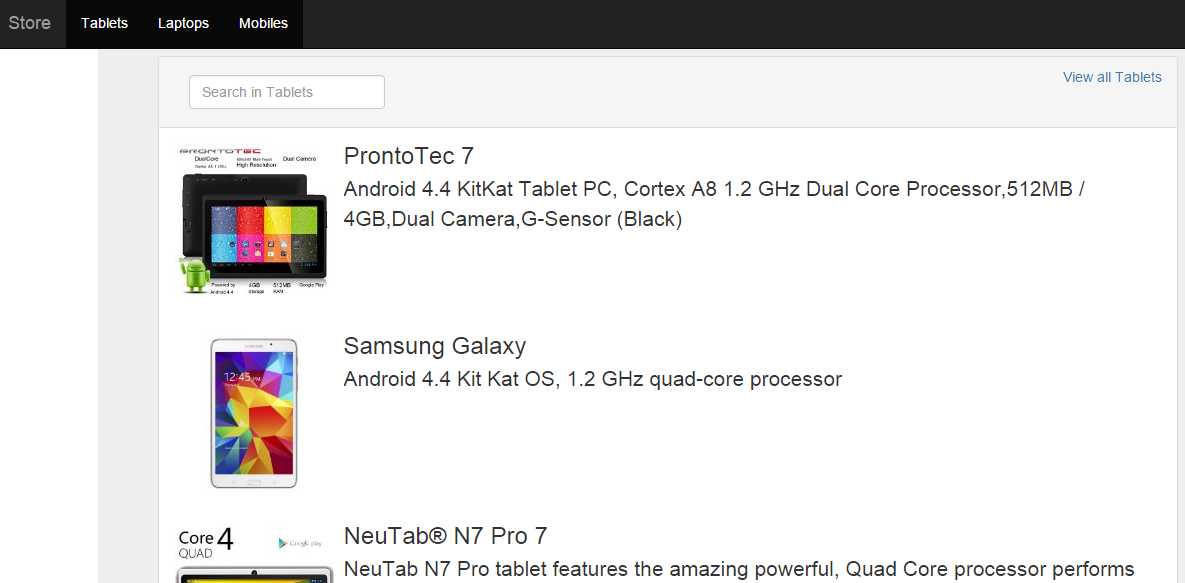
You can filter gadgets by category or search gadgets in a specific category. That’s it, we have finished creating a highly decoupled architecture that could support large scale MVC applications.
Github
I have decided to move all of my code to my Github account so you can download most of the projects that we have seen on this blog from there. You can download this project from here. I hope you enjoyed this post as much as I did.
In case you find my blog’s content interesting, register your email to receive notifications of new posts and follow chsakell’s Blog on its Facebook or Twitter accounts.
| .NET Web Application Development by Chris S. | |||

|

|
||
Categories: ASP.NET, Best practices
 chsakell's Blog
Thank you so much sir. Really helpful.
Excellent Article
Excellent overview and explanation. Keep posting marvels such as this. Thanks.
Excellent!.
Very good!
Hello, when first call goes to Home controller and invokes index method. At the end debugger showing me that dispose method is called but in call stack i cant see who has called. As i know dispose method can be invoked only manually (by developer explicitly written). In this situation i cant see who is invoking it ? Can you please explain me ? thanks.
Hi Artur, nice question. Since DbFactory inherits Disposable which in turns, implements the IDisposable interface, the Dispose() method will be called automatically. Hence, the IDisposable interface is the answer to your question.
To Debug this, put a breakpoint at the Dispose() method inside the Disposable class we created. The Dispose() function will call the Dispose(bool disposing) function which will probably call the override DbFactory.DisposeCore() in order to clean the DbContext object.
So you mean it invokes garbage collector at the end of work the context class trying to release unmanaged resources ?
Garbage collector automatically releases managed resources (at some point). We use the Dispose method to explicitly release unmanaged resources such as network connections (in our case DbContext’s database connection, etc..)
Hi Christos.S,
I tried to follow the guide and when I’m finish everything and run, I have an error of null DbFactory
        protected StoreEntities DbContext
        {
            get { return dataContext ?? (dataContext = DbFactory.Init()); }
        }
I think I already follow through all step with details, any advice ?
Hi Feli,
make sure you didn’t miss the following line of code which is responsible to inject an instance of DbFactory:
It resides inside the Bootstrapper.cs file where we set Autofac’s Container. If you still have problems, just download the solution from my Github account which is tested.
My records are deleted from database after modifying the model.
Hi Madhusudan,
thanks for your comment. Of course they are due to the following line of code:
In case you want to avoid losing your data simply enable Code First Migrations in your project. I will post about Entity Framework Code First Migrations as soon as possible. More over, do not forget to comment out the following line:
Thank you for good article.
Can you make a forms authentication tutorial? I think this is hard theme for many
Thank you so much for this post… 🙂
This post is great ! Really glad i stumbled upon this one, How it will define one to one relationship using fluent api ? there isn’t much about this fluent api usage for EntityTypeConfiguration. It will be great if you could share some more insights/knowledge for this
hank you for a great article on Best Practices. My friend is already using similar pattern in his application but he is really impressed to see the efforts you have made in this article.
There is an interface IRepository and an Abstract Class RepositoryBase.
but you are not implementing the IRepository in RepostoryBase Class.
but then in Concrete Repository (GadgetRepository & CategoryRepository) you are implementing it and inheriting those two classes from RepositoryBase.
is there any particular requirement for IRepository interface here??
i could not understand the usage of this interface along with the abstract class.
i also could not understand how we are utilizing the interface.?
can you please explain it a little?
Regards,
Hi Ali,
Well the idea is that the abstract but most important generic RepositoryBase<T> class, provides virtual implementations for the IRepository<T> interface. Hence, all custom child classes that inherit RepositoryBase<T>, such as the GadgetRepository, implement the IRepository<T> with the ability to override the virtual methods (if required). The most important thing is that by making those child classes implementing IRepository<T> (e.g. GadgetRepository : IGadgetRepository, with IGadgetRepository : IRepository<Gadget>, you are able to inject those custom implementations of type IRepository<T> through Autofac.
builder.RegisterAssemblyTypes(typeof(GadgetRepository).Assembly).Where(t => t.Name.EndsWith("Repository"))
.AsImplementedInterfaces().InstancePerRequest();
I hope I helped.
This is a very well written article, thanks!
I’m following along, and was curious about something. How well does this scale? It looks like every time I want to add a new model that needs to persist to the database, I need to not only create the class in Models, but also create a Configuration, Repository, Service, and add it to the Entities file.
Is this right? I feel like it could be a headache in a large application, not to mention very time consuming every time you want to add something.
I don’t want to sound like I’m criticizing or anything. I’m very new to ASP.Net MVC and just want to make sure I understand correctly, and that I choose the correct way of doing things for the type of application I’m working on.
Thanks again!
I couldn’t really see a way to edit or remove a comment, but after playing around with this setup for a while everything sort of clicked.
Thanks again for the article, it really helped me figure all this out.
This is what I’ve been looking for for a while now. Thank you very much!
Hi Chris,
First of all thank you so much for the great article. I have one question how I will use this architecture with
Database first approach with WebAPI….
Could you please guide me on this.
Thanks,
Vijay Kumar Sharma
hello, thanks for the nice article
I want to ask if we are not using any ORMs, how should be the architecture and best practices with classic sql commands, can you give an example for this. thanks.
+1
+1
Hi
Really very informative article. I need a clarification. IDbFactory would intialize the DbContext, and IunitofWork would commit the changes to the Database. , we can’t we use the DbFactory alone to Intialize and Commit. Please explain me why do we need seperate UnitofWork.
Thanks
Selvi
Thank a lot. It’s really helpful for me. I have a situation like we already designed a database and 5 different Asp.Net web forms application before 5 years, these application are used 3-tire architecure. Due to some issues we are planing to change only ONE application into MVC. So according to my situation, can I use EF Database first and as suggested above architecture?
Absolutely, you can safely use the described architecture using Entity Framework Database First.
If use Database First, the class StoreEntities will be generated in Store.Model project. And we need to add reference to EntityFramework for both Store.Model and Store.Data, right?
A very well written and well explained article – thanks a ton for sharing.
In Bootstrapper.cs class contains a method SetAutofacContainer() and I found this piece of code for registering the DI.
Code:
builder.RegisterAssemblyTypes(typeof(GadgetRepository).Assembly) .Where(t => t.Name.EndsWith("Repository")) .AsImplementedInterfaces().InstancePerRequest();Why you didn’t register the CategoryRepository and CategoryService?
We don’t need to RegisterAssemblyTypes of my 20 Repository class that is exist in my project, Is this line(“.Where(t => t.Name.EndsWith(“Repository”))” ) will take care to register the rest of our repository in my project. I’m I right?
That’s right. We made all repository classes end in “Repository” and service end in “Service” respectively so that we can register all of them with the following lines of code.
// Repositories
builder.RegisterAssemblyTypes(typeof(GadgetRepository).Assembly)
     .Where(t => t.Name.EndsWith("Repository"))
      .AsImplementedInterfaces().InstancePerRequest();
// Services
builder.RegisterAssemblyTypes(typeof(GadgetService).Assembly)
      .Where(t => t.Name.EndsWith("Service"))
       .AsImplementedInterfaces().InstancePerRequest();
This trick will work regardless of the number of repositories and services you have in your project.
Hi, how to use jQuery Unobtrusive Validation with those EntityTypeConfiguration? Is it has the same functionality as data annotation?
Thanks.
Thank you for the detailed article! I am also wondering about what Selvi asked. Why do we need the unit of work? Can we not just inject the IDbFactory into our service and use the DbContext property within the factory to call the SaveChanges() method?
Thanks
Hi kevin,
The answer is YES, you can just inject the IDbFactory into our service in the same way you could just inject it everywhere else in our application. But.. the idea behind the described architecture was to design and implement a highly loosely-coupled architecture with each component responsible for certain functionality. Let’s take the example that you and Selvi mentioned. You suggested to remove IUnitOfWork and instead use IDbFactory for both initializing the DbContext and committing the in-memory changes in the database. Let’s see how that would impact our architecture in details:
On the other hand and the way we implemented the IUnitOfWork pattern, you wouldn’t have to inject anything new into the services since the same IUnitOfWork could commit changes for more than one database (Maybe we can post about it some time..). The same applies for the data repositories since in case a service required more that one repositories, all those need to be injected. Our application wasn’t that large so we can live with that. In case though you wanted higher de-coupling you could create a Generic Data Repository Factory, inject it into the services and retrieve any type of data repository for a specific database. I have described this technique in the Discussion section of the Building Single Page Applications using Web API and angularJS post.
I hope I helped,
Kindest regards.
Thank you for your detailed feedback Christos! That makes sense. The way I am implementing it is slightly more basic (The chances of needing to scale and use multiple databases are highly unlikely for my application). I am using a generic repository only, and having my services inherit from that class. It seemed like too much unnecessary abstraction for my application’s case to have a complete repository layer. Thanks again!
Thank you so much for your detailed explanation. It really make sense.
Very helpful post!
Salut ! super article merci à toi ça aide beaucoup mais j’ai une petite question, pourquoi mettre la dll de DATA dans le WEB alors que le WEB n’appelle jamais le DATA ? Idem pourquoi mettre la dll de SERVICE dans le WEB alors que le WEB n’a besoin que des interfaces Iservice et non pas de son implémentation si j’ai bien compris le but de IOC (autrement dit pouquoi mélanger interfaces et implémentation dans SERVICE ?)
I am working in MVC4. What should be the method for Autofac ASP.NET MVC4 Integration in place of InstancePerRequest() method.
What do you mean? The .InstancePerRequest() method is not available? It’s an extension, make sure you add the following using statements in your code.
Dear, Christos S.
I’m doing some testing with ASP.NET 5 beta8 x64 and AutoMapper Version 4.0.0, which configuration should do to the “Startup” file in project Mvc 6. In the case of MVC 5 uses this AutoMapperConfiguration.Configure () ;.
Hi Paulo,
I am gonna post about this soon.
Should Autofac be installed for all projects?
Hi Janek,
Only on the Store.Web project.
I have an error:
Error 4 ‘Web.Mappings.DomainToViewModelMappingProfile.ProfileName.get’: cannot override inherited member ‘AutoMapper.Profile.ProfileName.get’ because it is not marked virtual, abstract, or override Store\Web\Mappings\AutoMapperConfiguration.cs 30 13 Web
Typos:
Bootrap
Start_App
Hi Janek,
You can find information about how to use AutoMapper in their Github account.
Hi Janek, did you solve this issue? If so, can you advice how you did it. Thanks
You don’t have to override the ProfileName property anymore, just the Configure() method.
Hello, will this architecture work with Microsoft Azure?
Absolutely.
Great article! Had a question regarding views that need info from multiple entities though. How would that work in this case? The VMs described here are a 1-1 mapping with entities. Can automapper map multiple entities to a single viewmodel??
Mahesh,
There is an 1-1 mapping with entities but this actually allow you to map a list of entities to a respective list of VM.
If this doesn’t fit your needs though, you can create a custom ViewModel that contains for example a list of other POCOs. You will have to setup manually the mapping as follow:
Mapper.CreateMap<Album, AlbumViewModel>()
                .ForMember(vm => vm.TotalPhotos, map => map.MapFrom(a => a.Photos.Count))
                .ForMember(vm => vm.Thumbnail, map =>
                    map.MapFrom(a => (a.Photos != null && a.Photos.Count > 0) ?
                    "/images/" + a.Photos.First().Uri :
                    "/images/thumbnail-default.png"));
We did something similar for the GadgetFormViewModel vm.
protected override void Configure()
        {
            Mapper.CreateMap<GadgetFormViewModel, Gadget>()
                .ForMember(g => g.Name, map => map.MapFrom(vm => vm.GadgetTitle))
                .ForMember(g => g.Description, map => map.MapFrom(vm => vm.GadgetDescription))
                .ForMember(g => g.Price, map => map.MapFrom(vm => vm.GadgetPrice))
                .ForMember(g => g.Image, map => map.MapFrom(vm => vm.File.FileName))
                .ForMember(g => g.CategoryID, map => map.MapFrom(vm => vm.GadgetCategory));
        }
Mind that Automapper is quite flexible, you don’t have to map a VM to a single entity but in to whatever you want. You just have to defined the mapping between those two classes.
I wouldn’t recommend though this kind of practice.
Thank you so much for this article.
Thank you! Very interesting and clean tutorial.
Excellent article.By the way,do you have add the transaction mechanism into this tutorial. I’m looking forward to your new tutorial about the transaction mechanism. Thank you from the bottom of my heart.
Hi Chris,
Thank you for this great article.
I would very appreciate, if you could give me some advice about how to integrate functionalities of AspNet.Identity in this architecture.
Hi Erik,
We have used AspNet.Identity in the AngularJS feat. Web API – Security post. We used Bearer Token Authentication along with Web API but the basics to get started are all the same. I ‘ll make sure though to use it on later posts as well.
Hi sir,What an excellent article you have shared.I have enjoyed thoroughly while reading the article.This is the only place where i find information about best practice.Great stuff.Where did you learn all these stuff? :)i would like to learn to architect applications like this.Keep posting:)
Hi Chris,
Great article. It really helped me to build a better architecture mindset for crafting ASP.NET MVC solutions.
Moreover, I enjoyed reading through this post a lot, particularly the demonstration of some of the best practices (DI, Patterns, SoC).
Thanks for sharing, keep up the good work!
Hi Chris,
This is one of top article that i read about best practise.I couldnt understand why you create GadgetService. You create GadgetService implement from IGadgetService but you didnt use GadgetService class in Home Controller just use IGadgetService Why you dont create an instance from GadgetService.
Thank you.
Hi Enes,
This is why we configured Dependency Injection for, in our application. An instance of GadgetService will be automatically be injected on the HomeController constructor when the request is dispatched. Autofac will also dispose this instance when the request ends. By using IGadgetService on the constructor you will be able to change the implementation type whenever you want, something that helps you mocking the service and testing your controller’s behavior.
Hi,
I want to start a project where I need to use Entity Framework – Database first.
I have 2 different databases that I need to use (SQL server), so I guess I will have 2 edmx files in my project.
How can I change the Repository pattern from your example, to suit my case?
Thanks
Hi Maria,
All you have to do is let the tool generate the entities and the DbContext for you. Then, just reference those classes on the repositories instead of the old ones. Let’s assume that you want to apply it in our project. You would have to replace the Entities in the Store.Model project and the StoreEntities DbContext class in the Store.Data with those that the tool will automatically generate for you. This means that you can remove the Store.Model project from the solution and then add the respective .edmx Model in the Store.Data project. Remove any references to the old StoreEntities DbContext class and replace them with the one that generated. You also need to remove the StoreSeedData class we wrote and the Configuration folder with the EntityTypeConfigurations we created. At the end you have to change the Web.config to read the information from the .edmx metadata to something like this:
<connectionStrings> <add name="StoreDbEntities" connectionString="metadata=res://*/StoreDbEntitiesModel.csdl|res://*/StoreDbEntitiesModel.ssdl|res://*/StoreDbEntitiesModel.msl;provider=System.Data.SqlClient;provider connection string="data source=(localdb)\v11.0;initial catalog=StoreDb;integrated security=True;MultipleActiveResultSets=True;App=EntityFramework"" providerName="System.Data.EntityClient" /> </connectionStrings>If this doesn’t work on this project that’s all right, it may require other changes too. All you have to remember is to use the DbContext and the Entities automatically generated. All the logic, especially in the Infrastructure and Repositories folder in the Store.Data project should work fine as it is.
Thanks for the awesome write up – found this really useful whilst putting together the data access layers of my application 🙂
Excellent work. NopCommerce follows this architecture.
could you please know me onething? as you are using autofac, there is no parameter less constructor in controller, isn’t controller will complain for implement the parameter less constructor?
Nice Article.Deeper level explanation.
It’s awesome!!! Thank you!
Many thanks for the article,a great and valuable resource !